Demo · not open for live business
The Cuttleflow Marketplace is being built with the brokers and markets who will use it. It is not open for live business, and nothing on these pages or in the demo is a quote, an offer or cover. Cuttleflow Pty Limited does not hold an AFSL and does not issue, arrange or advise on insurance products. Each class opens only when its opening conditions are met, including licensing advice.
For brokers
Place specialty lines without the email chain.
Every market in one place: insurers, agencies, Lloyd’s coverholders and new entrants. One set of client answers, quotes on the same wording, a bind on the platform, and the placement report and client report produced from the same record.
How a placement works today, and on the platform
| Step | By email | On the platform |
|---|---|---|
| Client information | A proposal form per market, retyped or re-sent | The client answers the standard question set once, in your branding |
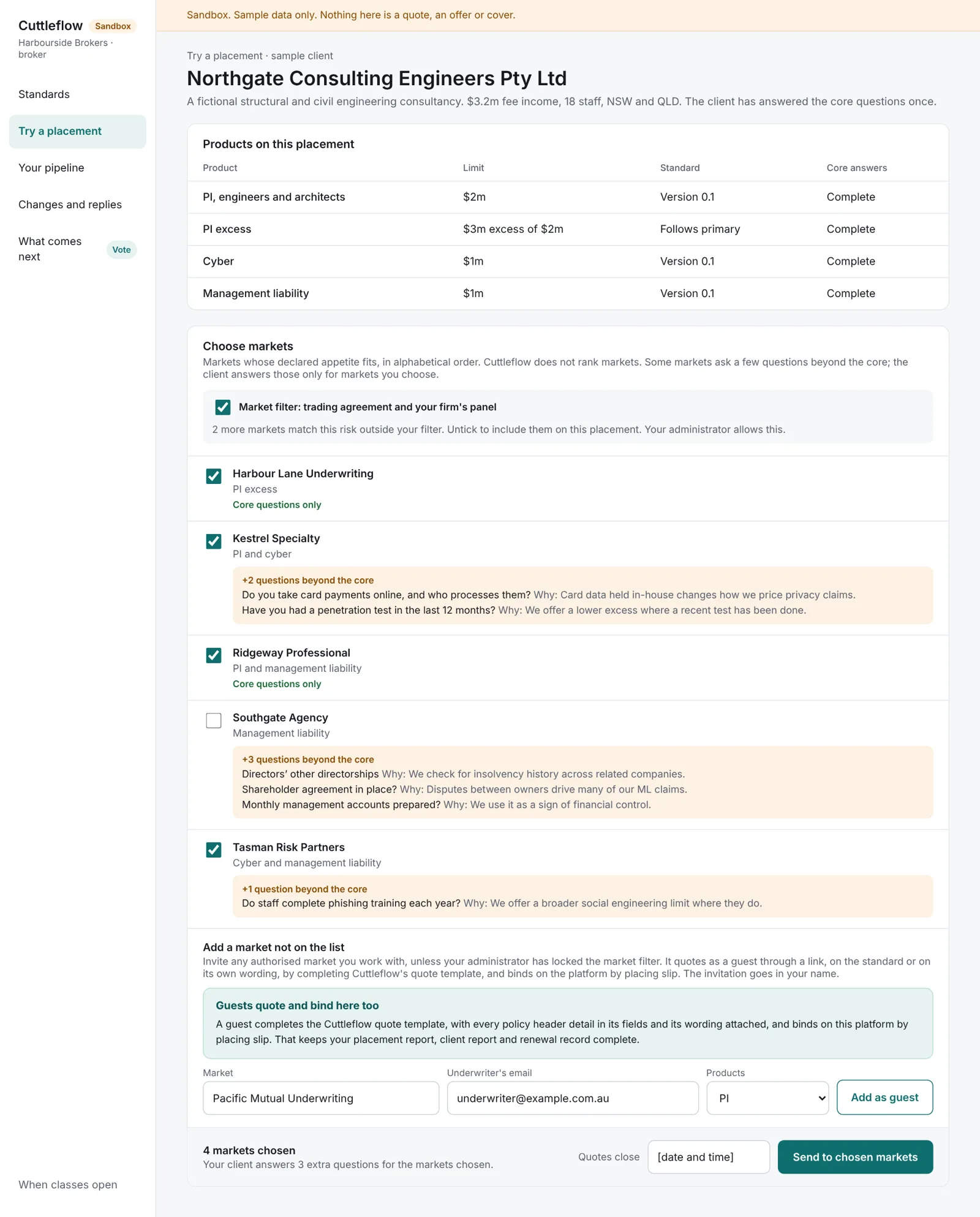
| Approaching markets | One email per market, then chasing | Every market whose rules accept the risk is shown; you tick the ones you want and set a closing time |
| Comparing quotes | Different wordings, copied into a spreadsheet | Quotes on the same wording, in one table, in the order they arrived |
| Binding | Email confirmation, documents to follow | Bind on the platform; documents produced from the same data |
| Reporting | Written up by hand | Placement report and client report from the record |
| Next renewal | Start again | Last year’s answers prefilled; the client confirms or changes them |
Every market in one place
Members, guests, and your own filter.
Members
Markets that join see every risk their underwriting rules accept, quote on the standard wording, and appear in your comparison automatically.
Any other market, by invitation
Add any authorised market you work with, by name and email. It quotes through a link without registering, on the standard wording or on its own. Every guest completes the Cuttleflow quote template, so all the policy header details go into fields: insurer and AFSL, wording, period, limit, excess, sub-limits, extensions, exclusions, retroactive date, defence costs, premium and charges, and validity. A guest on its own wording also attaches that wording and can add conditions. Its quote is shown separately, marked as not directly comparable, with every field and condition listed. If you bind with a guest, the platform produces a placing slip from those fields and the guest’s underwriter signs it on the platform first.
Your market filter
Your firm can limit the markets you send risks to: those with a trading agreement with the firm, those on its panel, or both. Your administrator sets the filter and decides whether brokers can remove it on a placement. Brokers can normally remove it, because some risks cannot be placed with the panel. The screen shows how many matching markets sit outside your filter.
Placing a risk
Six formats, in plain English.
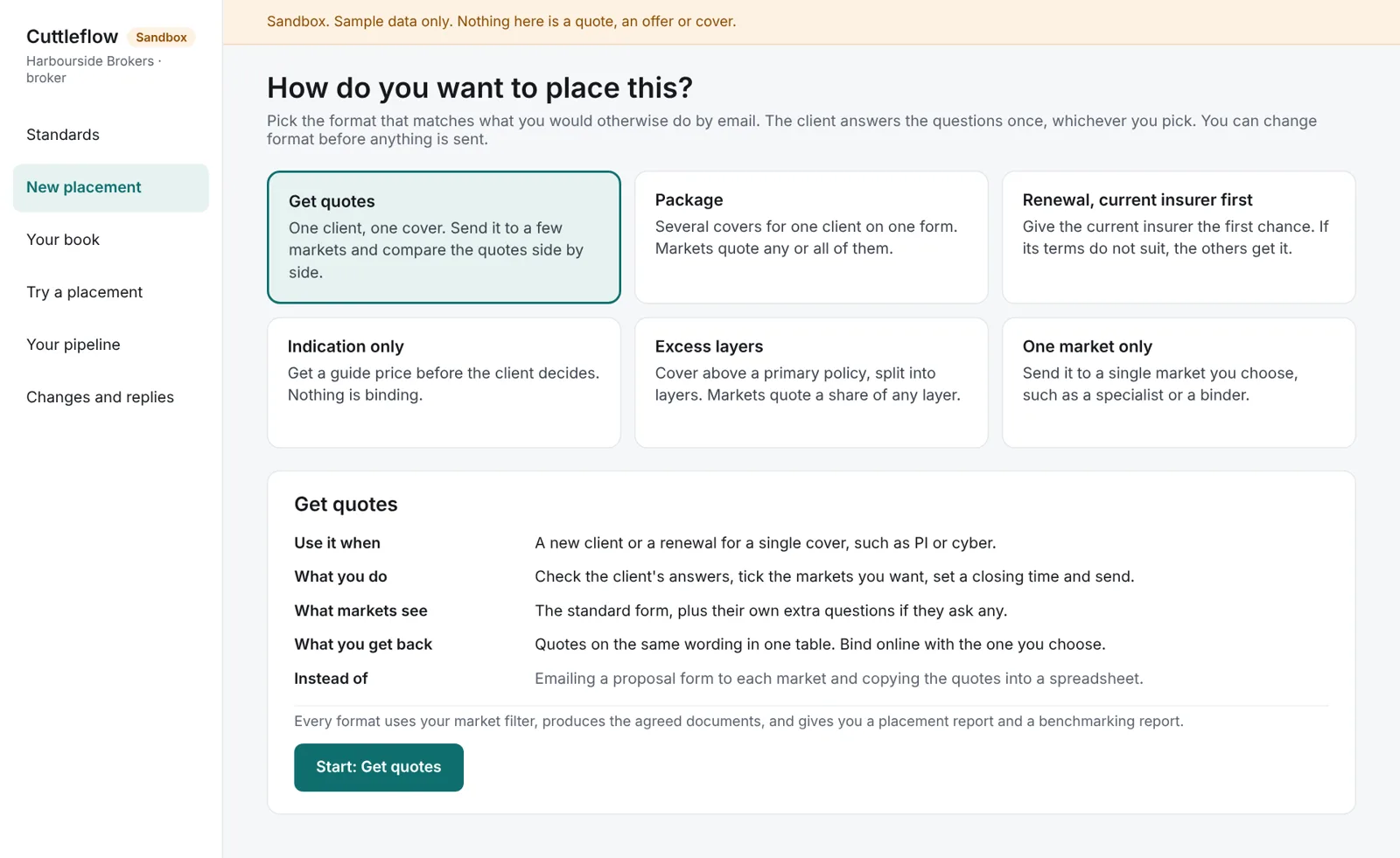
Pick the format that matches what you would otherwise do by email. The client answers the questions once, whichever you pick.
| Format | Use it when | Instead of |
|---|---|---|
| Get quotes | One client, one cover, a few markets, compared side by side | Emailing a proposal form to each market |
| Package | Several covers on one form; markets quote any or all of them | Separate emails for each cover |
| Renewal, current insurer first | The current insurer gets a set period; then the other markets you chose | Asking the incumbent, waiting, then starting again |
| Indication only | A guide price on the minimum questions, convertible to a firm quote | An informal email asking for a ballpark |
| Excess layers | Shares of layers you define above a primary, with the cheapest tower shown | Building the tower by phone and spreadsheet |
| One market only | A single chosen market, such as a specialist or a binder | A direct email to one underwriter |
Placement and client reports
Two reports from one record.
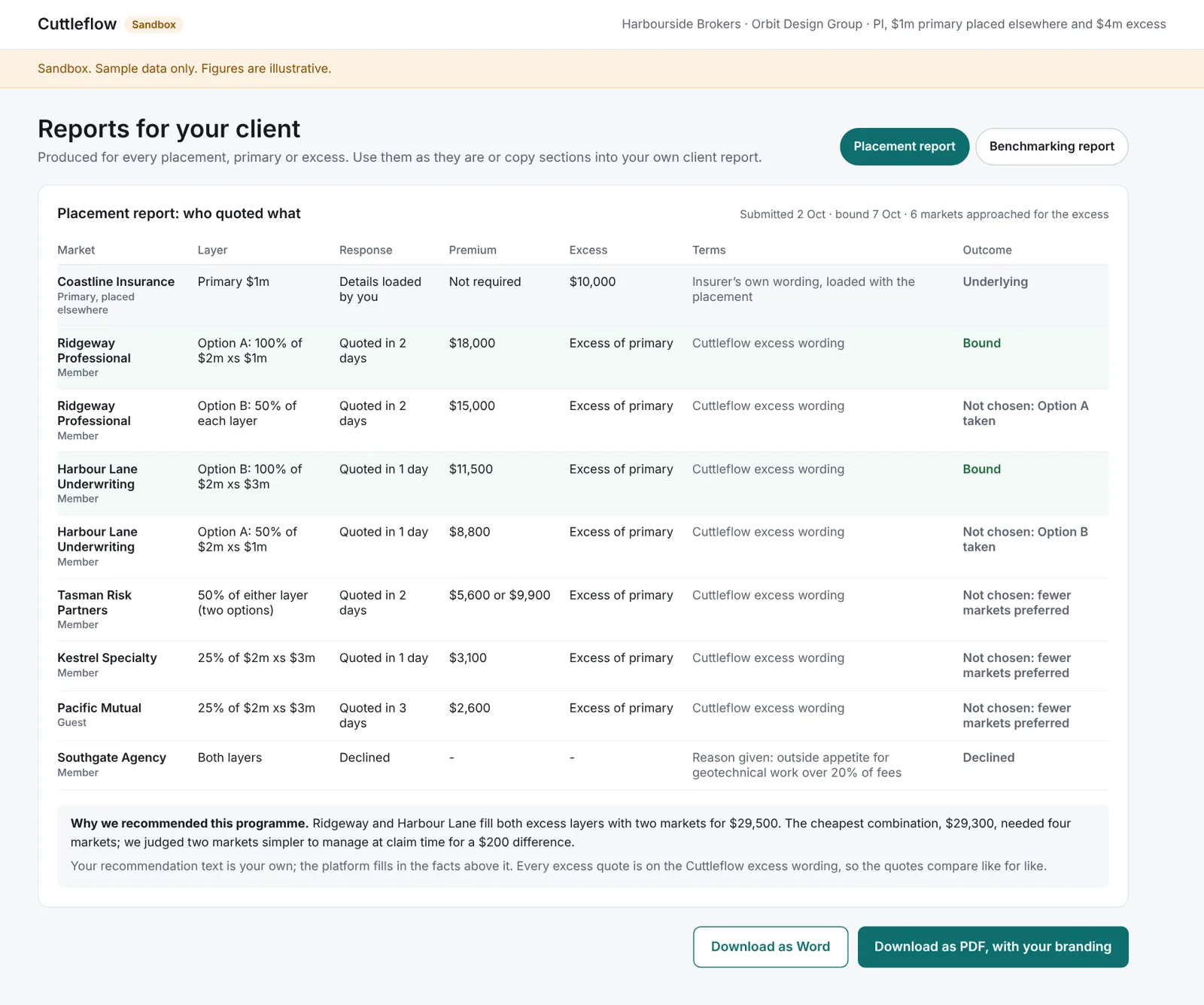
The placement report is your file note: which markets were approached, who quoted, who declined and why, how long each took, and what was bound. It is your record of the approach to market.
The client report sets out the quotes for your client: price, extensions, subjectivities and wording, with any guest quote on its own wording marked as not directly comparable. You add your recommendation.
Because both come from what is recorded on the platform, they are only complete if the placement is finished there. Next year’s renewal can be prefilled only from a placement completed on the platform.
Renewals and cross-sell
Work on many clients at once.
Renewal rounds
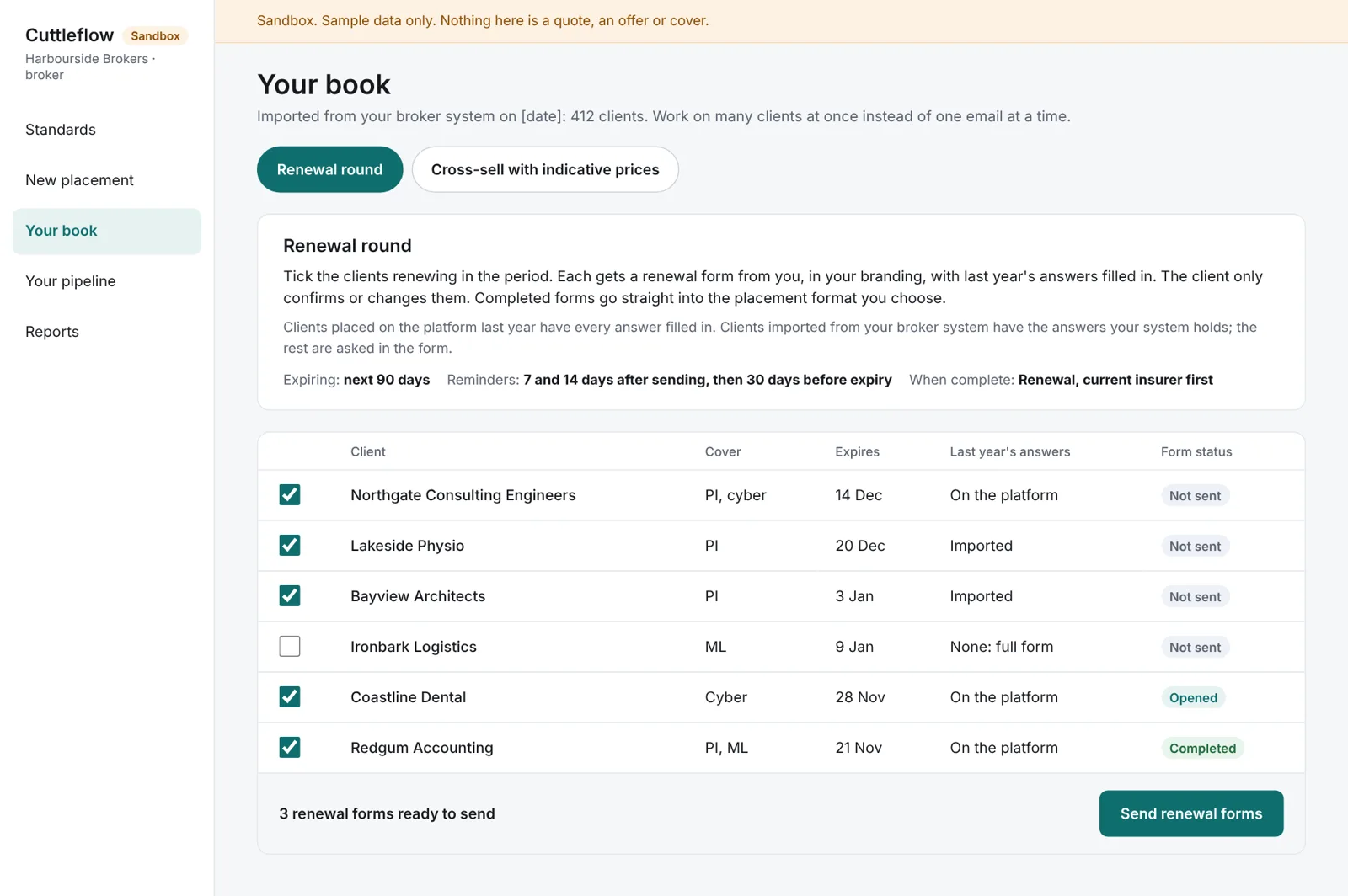
Select the clients expiring in a period and send renewal forms to all of them at once, in your branding, prefilled with last year’s answers. The client confirms or changes them. Reminders are scheduled, each form’s status is tracked, and a completed form goes straight into the placement format you choose. Each form carries the duty of disclosure notice.
Cross-sell with indicative prices
The platform finds clients in your book without a cover. Markets that opt in give indications from six facts with no client named: industry, revenue band, staff, state, years trading and limit. You send each client an indicative price with no market named. Clients who respond answer the minimum questions for a firm quote, and can accept it on your page under your bind settings (see below).
These tools matter most from the first renewals on the platform, when every answer is already there. For clients imported from your broker system, the answers your system holds are prefilled and the rest are asked.
Cuttleflow for Brokers · in the demo
Indicative quote to bound policy, on every channel.
Your clients and prospects get an indicative price where they already are, and can go on to a firm quote and a bound policy in your name. Every channel ends on your page, which carries your name, AFSL number and complaints path.
Channels
- Email, newsletters, social posts, ads and QR codes. A signed link for each campaign opens your page with the industry and covers filled in. For existing clients, the answers you already hold are filled in too. You write and send the campaign.
- The proposal form you send. Switch on a live indicative price for each form. It updates when the client finishes each section, and you see any answer changed after a price was shown.
- Your website. The industry lookup and the price on your own site, limited to the web addresses you list.
- Partners, through the API. For example, an association’s member site. Every call uses your key, so every lead is yours.
- AI assistants, through MCP. Your own MCP address lets an AI assistant find the covers a business needs and get your indicative price. It hands the client to your page to accept.
- Your CRM or broker system. Every lead, price and bind is sent as it happens, or exported as a file.
How clients bind
You choose, for each class:
- Indication only. The client sees a price, and you take it from there.
- Firm quote. The client answers the remaining questions, and you present the named quotes.
- You approve each bind. The client accepts, and you approve with one click. This is the default.
- Online bind within limits. Only where the insurer has agreed to it in writing, and only within the limits it sets. Anything outside them comes to you.
The rules
- Prices come only from insurers that publish indicative rates, from the same rating as the firm quote. A range is shown only when two or more insurers price the risk, and it says how many.
- The wording shown with every price is set by Cuttleflow and cannot be edited: what the price is based on, how long it is valid, and that it is subject to the full questions and underwriting.
- Leads from your own channels are yours: never sold and never passed to another broker.
- No AI sets a price or binds a policy.
Leads from the public marketplace
A business that searches the Cuttleflow public marketplace by what it does sees the covers it needs and an indicative price range, then agrees to be referred to one named broker. Subscribe by industry and state, for a flat monthly fee that does not change with the number of leads. Each lead arrives in Priority leads with the business’s answers, the price it saw and its consent record, and a one-hour response timer, and goes on to markets as a normal submission.
In the demo now. Prices go live class by class, as insurers agree to publish their rates and allow online bind. Public marketplace leads are in development. More about Client Acquisition →
Checks and costs
What the platform enforces.
- ABN. Your client’s ABN is checked against the Australian Business Register when you enter the client.
- Sanctions. Your client is screened against the Australian sanctions list when you send the submission and again at bind. A possible match stops the placement until it is cleared.
- Taxes and charges. A market can send an indication or a quote before its taxes are complete, so you can compare early, but you cannot bind that quote until they are filled in.
- Finish on the platform. Guest markets that Cuttleflow believes routinely place off the platform after quoting, and do not record results, may be suspended from receiving risks.
AI. Cuttleflow’s AI runs in Microsoft Azure in Australia. It makes no decisions in the quote or bind path. It only summarises and does external research.
Cost. The platform is free during the Beta testing period, with charges to follow. Charges will be published before any class opens for live business.
What we ask brokers in round 1
Two or three of your own recent placements.
We ask two to four brokers to record the time taken on two or three of their own recent placements: collecting answers, approaching and chasing markets, comparing quotes, writing the client report, and the number of emails per placement. You then repeat the same placements on sample data in the demo. Results are reported only as totals that identify no broker. We will not quote any time saving until this has been measured.
We also ask for your comments on the standard question sets and wordings, and an indication of which renewals you would place on the platform when a class opens.